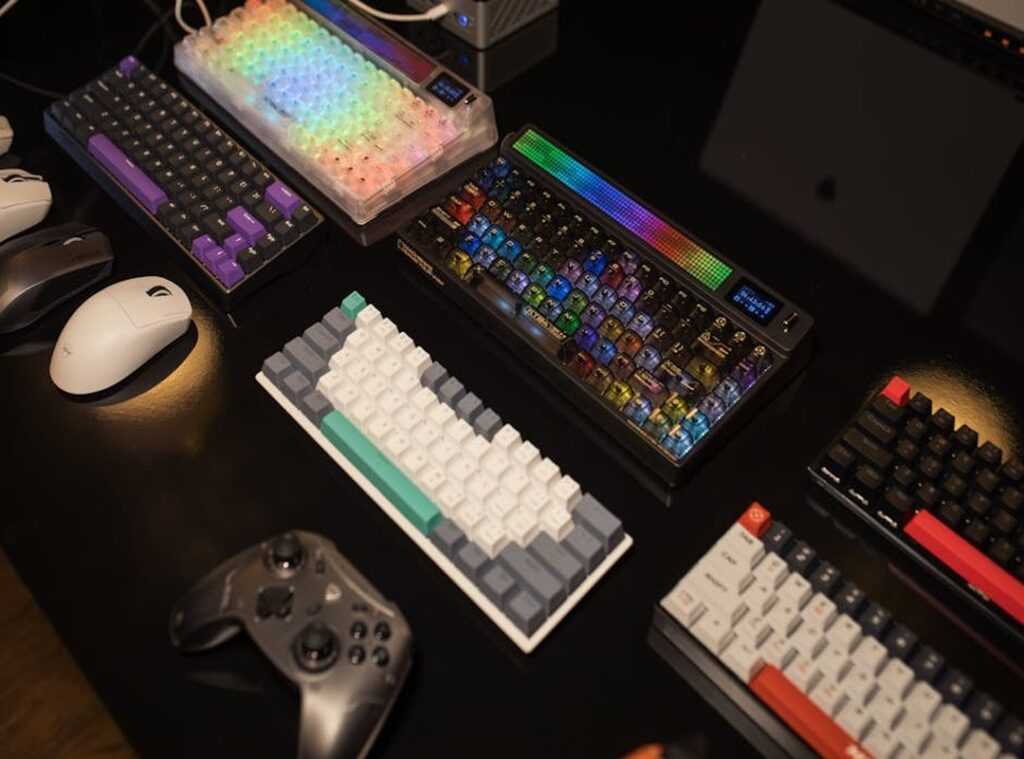
Ever stood in that aisle, digital or physical, staring at a wall of keyboards with flashing lights and names that sound more like fighter jets than gaming gear? Picking the right one feels like a high-stakes boss battle. Get it wrong, and your gameplay suffers.
Trust me, I’ve been there. After countless hours of testing and grinding through every key switch and tech gimmick, I’ve cracked the code. I’ve found what works, and what’s just hype.
This is your gaming keyboards guide. We’ll cut through the noise, helping you find that perfect keyboard (one) that feels like an extension of your hands.
This guide is your quest map. It’s tailored to your playstyle. Ready to level up your setup?
Let’s dive in and make sure your next gaming session is your best yet.
The Three Pillars: Switches, Size, and Build
Let’s cut to the chase. Your gaming keyboard is more than just a slab of keys. It’s got three core stats you gotta consider: switches, size, and build.
Think of switches as the engine of your keyboard. There are three main types: Linear switches feel like a smooth glide, Tactile has a small bump (like a speedbump), and Clicky offers both a bump and that satisfying click sound. It’s like picking between a silent ninja and a tap-dancing robot.
Size matters too. It’s your keyboard’s chassis. Full-Size keyboards come with everything, including a number pad.
They’re perfect for productivity or MMO enthusiasts. On the other hand, Tenkeyless (TKL) trims off the number pad, great for gamers who need extra desk space for mouse movements (especially FPS players). Then there’s the minimalist 60%/65% keyboards.
They strip down to the essentials. Less clutter, more space to wave your arms around.
Build quality is the keyboard’s armor. Cheap plastic? Flimsy.
Go for durable materials like aluminum if you want something that can take a punch. Keycaps tell another part of the story. PBT keycaps are sturdy and textured, holding up under sweaty gaming marathons.
ABS keycaps? Smooth but they get shiny. It’s like the difference between a rugged SUV and a polished sports car.
Looking for more on peripherals? You might want to check out vr headsets what to know before buying. It’s all connected.
Get smart about your setup.
Choose Your Class: Matching Switches to Your Game
Ever felt like your keyboard could use a class upgrade? Picking the right switch for your gaming style is like choosing the perfect weapon. In this gaming keyboards guide, we’ll break down which switches fit different player archetypes.
Spoiler: it’s not one size fits all.
The FPS Sharpshooter: Linear Switches
If you’re the kind of player who thrives on precision and speed, linear switches are your best friend. These switches (think Cherry MX Red) offer a smooth, uninterrupted press. Perfect for games like VALORANT or Apex Legends where every millisecond counts.
You need to move, shoot, and react in an instant. Ever tried strafing or double-tapping? Linear switches make it smooth.
No resistance, just pure, fast action. It’s essentially a cheat code for your fingers.
The MMO & RTS Strategist: Tactile Switches
Tactile switches are for the strategic minds who revel in complex rotations and commands. Cherry MX Brown, anyone? The noticeable bump signals you’ve pressed the key, but without requiring that full press.
That’s gold in games like WoW or StarCraft. You’ll know your command is sent without even looking down. No more accidental double casts or missed skills.
It’s about control and precision, which you need when orchestrating large-scale attacks or managing detailed strategies.
The All-Rounder & Typing Champion: Clicky Switches
Clicky switches are the jack-of-all-trades, especially if you game and type. Cherry MX Blue is the classic choice here. The audible click and tactile bump offer a satisfying feedback loop.
Typing? It’s a dream. But there’s a downside: the noise.
If you’re streaming or have roommates, that click can become a “noise debuff”. Yet, for hybrid gamers who also write or code, this switch might be your perfect ally.
In this world of switches, the choice can be daunting. Want more info? Check out this gaming keyboards guide for a deep dive into options.
Choose wisely, and upgrade your gaming class.
The Armory: Important Features vs. Flashy Gimmicks
As someone who spends way too much time with my hands on a keyboard, I’ve got some thoughts on what makes a gaming keyboard truly important. We all love shiny things, but not everything that glitters is gold. In the world of keyboards, separating the must-haves from the nice-to-haves is key.

First up, let’s talk about N-Key Rollover (NKRO) and Anti-Ghosting. If you’re knee-deep in a heated battle, the last thing you want is your keyboard missing a beat. These features make sure every keypress counts, no matter how wild things get.
You wouldn’t play a game without a sword, right? Same logic here.
Now, programmability and macros are like having your own custom spellbook. Remap keys or create macros, and suddenly you’ve got an edge in those intense MMOs or plan games. But if you’re just playing to unwind, this might be overkill.
Know your needs, people.
Then there’s RGB lighting. Sure, it looks cool and might help highlight keybinds, but let’s be real. It’s like a cosmetic item in a game: fun and flashy, but won’t boost your score.
If you’re tight on cash, don’t blow your budget just for a light show.
Other features like dedicated media keys and USB passthroughs are those “quality of life” add-ons. Nice if you can afford them, but not mission-key. Oh, and if you’re interested in building budget friendly gaming pc, check out more tips on getting the best gear for less.
In this gaming keyboards guide, prioritize what truly enhances your play.
Entering God Mode: The Future of Keyboard Tech
Are you tired of lagging behind in your games? Let’s talk about Magnetic (Hall Effect) Switches. This tech is all about giving you that legendary tier edge.
Imagine firing a shot the instant your finger touches a key, and resetting it the moment you lift off. That’s the kind of speed we’re talking about: customizable actuation points and “Rapid Trigger” functionality. It’s not magic, but it’s close.
Optical switches are also worth mentioning. These use light for actuation, making them lightning-fast and durable. They’re a solid contender if you’re speed-focused and looking to ditch traditional mechanical switches.
The debate between magnetic and optical is like comparing a sports car to a fighter jet. Both are fast, but they have their own unique perks.
For the dedicated enthusiasts, custom firmware like QMK or VIA is your playground. It’s the final frontier for those who love to tinker and “min-max” their setup. You can control every key, layer, and function.
Sure, it’s complex, but if you’re in this deep, complexity is your middle name.
This is your gaming keyboards guide to entering god mode. Are you ready to level up?
Level Up Your Game with the Right Keyboard
You’ve cracked the code. No more drowning in the sea of tech jargon. You hold the power to pick a keyboard that suits your gaming style.
Remember how overwhelming it felt to get through the market? Forget the fluff. Focus on the switches, size, and features that matter to you.
That’s the secret.
Use this gaming keyboards guide as your roadmap. No more guessing games. You’ve got what it takes to conquer your next challenge.
Take this guide, check off those essentials, and find the keyboard that elevates your play.
Still hesitating? Don’t. You’re ready.
Dive into your search now, armed with knowledge and confidence. Discover your endgame keyboard. Because let’s face it, your next victory depends on it.
Don’t wait. Start now.
 Founder & CEO
Ask Koralia Tornhanna how they got into mag-based game engine explorations and you'll probably get a longer answer than you expected. The short version: Koralia started doing it, got genuinely hooked, and at some point realized they had accumulated enough hard-won knowledge that it would be a waste not to share it. So they started writing.
What makes Koralia worth reading is that they skips the obvious stuff. Nobody needs another surface-level take on Mag-Based Game Engine Explorations, Hot Topics in Gaming, Core Mechanics and Playstyles. What readers actually want is the nuance — the part that only becomes clear after you've made a few mistakes and figured out why. That's the territory Koralia operates in. The writing is direct, occasionally blunt, and always built around what's actually true rather than what sounds good in an article. They has little patience for filler, which means they's pieces tend to be denser with real information than the average post on the same subject.
Koralia doesn't write to impress anyone. They writes because they has things to say that they genuinely thinks people should hear. That motivation — basic as it sounds — produces something noticeably different from content written for clicks or word count. Readers pick up on it. The comments on Koralia's work tend to reflect that.
Founder & CEO
Ask Koralia Tornhanna how they got into mag-based game engine explorations and you'll probably get a longer answer than you expected. The short version: Koralia started doing it, got genuinely hooked, and at some point realized they had accumulated enough hard-won knowledge that it would be a waste not to share it. So they started writing.
What makes Koralia worth reading is that they skips the obvious stuff. Nobody needs another surface-level take on Mag-Based Game Engine Explorations, Hot Topics in Gaming, Core Mechanics and Playstyles. What readers actually want is the nuance — the part that only becomes clear after you've made a few mistakes and figured out why. That's the territory Koralia operates in. The writing is direct, occasionally blunt, and always built around what's actually true rather than what sounds good in an article. They has little patience for filler, which means they's pieces tend to be denser with real information than the average post on the same subject.
Koralia doesn't write to impress anyone. They writes because they has things to say that they genuinely thinks people should hear. That motivation — basic as it sounds — produces something noticeably different from content written for clicks or word count. Readers pick up on it. The comments on Koralia's work tend to reflect that.